
 By Palm Hill
Keep PDFs on your computer.
Review contracts, financial filings, and compliance packs without uploading their contents. Comparison runs locally, with no Palm Hill account.
Status: Free download
PDF Diff compares financial statements, contracts, and review packs, then saves a highlighted PDF. It runs on your Mac or Windows PC. Your PDFs never leave your computer.
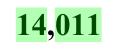
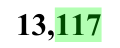
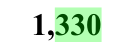
See a sample comparisonSangoma’s fiscal 2025 Q1 and Q2 statements. Actual amounts and highlights from the exported PDF.
| Line item | EarlierSep 30, 2024 | LaterDec 31, 2024 |
|---|---|---|
| Cash and cash equivalents | 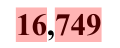 |
 |
| Trade and other receivables | 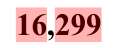 |
 |
| Inventories | 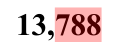 |
 |
| Sales tax receivable |  |
 |
| Income tax receivable | 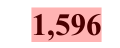 |
 |
| Contract assets | 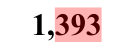 |
 |
| Derivative assets |  |
 |
| Other current assets | 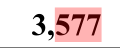 |
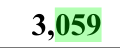 |
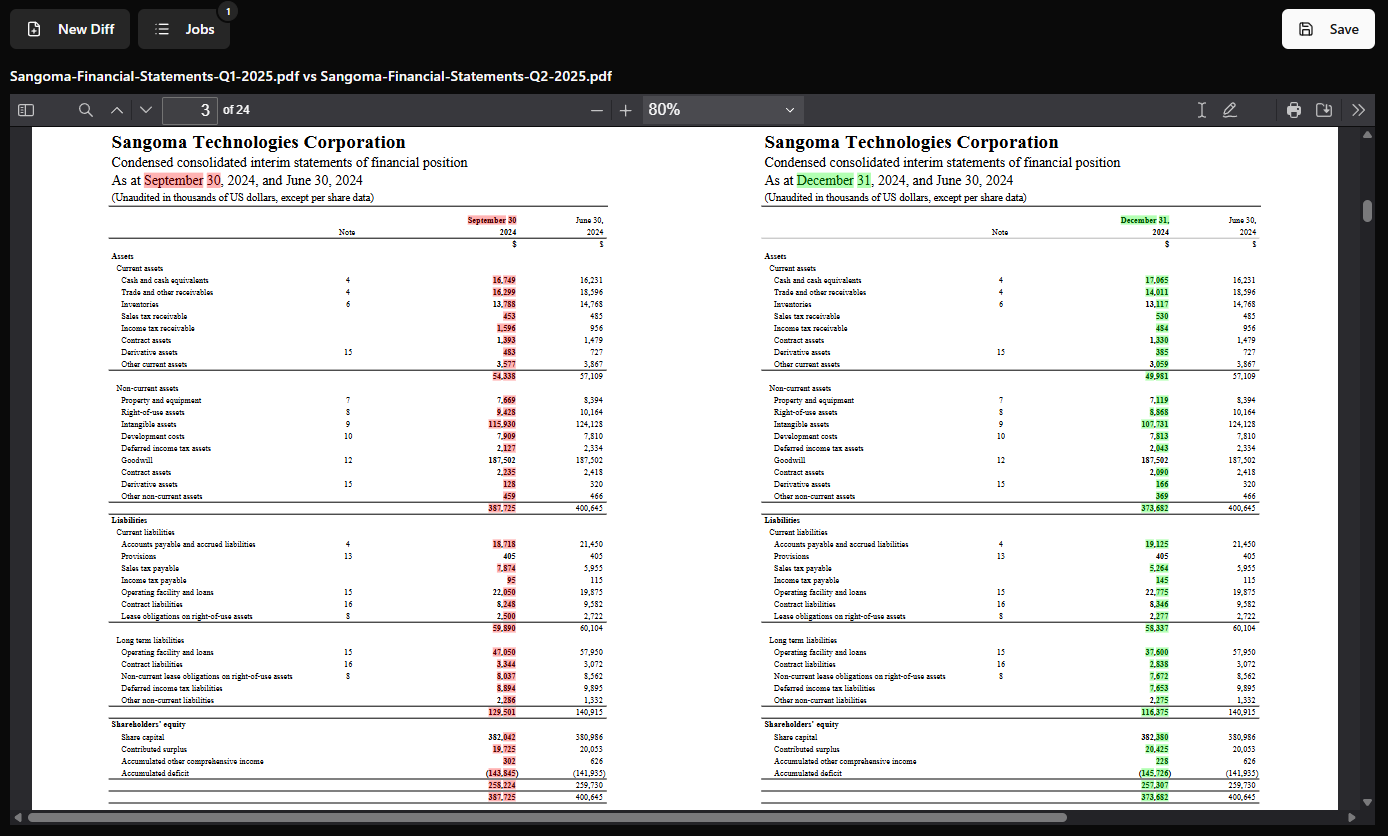
Sources: Original Q1 statement and original Q2 statement. This alignment example omits page 5 from the Q1 input; the exported comparison identifies it as “Original Missing.”
Review contracts, financial filings, and compliance packs without uploading their contents. Comparison runs locally, with no Palm Hill account.
Automatic alignment helps match corresponding pages when additions, deletions, or layout changes move content between pages.
Review insertions in green and deletions in red. Export the side-by-side PDF for a workpaper, review pack, or colleague.
The app processes your documents locally. PDFs and comparison results are not uploaded. Store downloads and this website have their own analytics; they do not receive the PDFs you compare in the app. Read the app privacy policy.
Drop in the earlier and later versions, or select them from your computer.
Let the app align pages, then inspect the highlighted differences side by side.
Export the comparison as a separate file. Your original PDFs stay intact.
Choose automatic alignment, reading order, flexible semantic matching, or page-number matching. Adjust similarity where supported, PDF compression, highlight colors, and opacity. Light, dark, and system themes are available.
Install from your platform’s store. No Palm Hill account or API key required.
macOS 12 or later · Apple Silicon (M1 or later)

Windows 10 version 1809 or later, or Windows 11 · x64

Sizes reflect the store listings checked September 15, 2026 and may change with updates. Stores require an internet connection for installation and updates and may ask you to sign in. This is a desktop app; the Mac version requires Apple Silicon.
Yes. The installed app compares PDFs and matches pages locally. An internet connection is needed to download the app and receive updates through the store.
No. Document processing and page matching take place on your computer. Your PDFs and comparison results are not sent to Palm Hill or a comparison service. App privacy details.
Automatic alignment matches pages by their content, helping follow changes when pagination shifts. You can also choose reading-order, flexible semantic, or page-number alignment. Review the result when documents have substantial structural changes.
Yes. Save a separate PDF with the earlier and later documents side by side and changes highlighted. Open a real exported comparison to see the format.
You can queue multiple individual comparisons in the desktop app and review them in Jobs. The desktop download does not include a public API or an automated folder-batch interface.
PDF Diff compares extracted text. For image-only scans, first use an OCR tool to add selectable text, then compare the resulting PDFs. It is not a pixel-by-pixel image comparison tool.
No Palm Hill account or API key is needed to compare documents. Apple or Microsoft may ask you to sign in to their store to install the app.
Use PDF Diff to compare PDFs locally and save the result. It compares extracted text; it is not an OCR tool or a pixel-by-pixel image comparison tool. Review the highlighted changes before relying on the result.
| Option | When it fits |
|---|---|
| PDF Diff | You want free, local PDF comparison with highlighted export on Mac or Windows. |
| Adobe Acrobat Pro | You already use Acrobat’s broader PDF toolset and its desktop Compare Files feature meets your needs. |
| Draftable Desktop | You need offline comparison and PDF export across formats such as Word, Excel, PowerPoint, and PDF. Review its current licensing options. |
| Custom scripts | You need a customized or automated workflow and can maintain the setup. Visual output depends on the implementation. |
Vendor information checked September 15, 2026. Follow the product links for current features and terms.
Free to install. Your documents stay on your computer.